 Kitchen AI

- Inspiration
- Reference photo
- See it first
How to Recreate a Pinterest Kitchen in Your Own Kitchen
Copy the materials, not the room. Here is one inspiration photo applied to one real kitchen, twice, with what carried over, what changed between the two runs, and what the app had to guess.

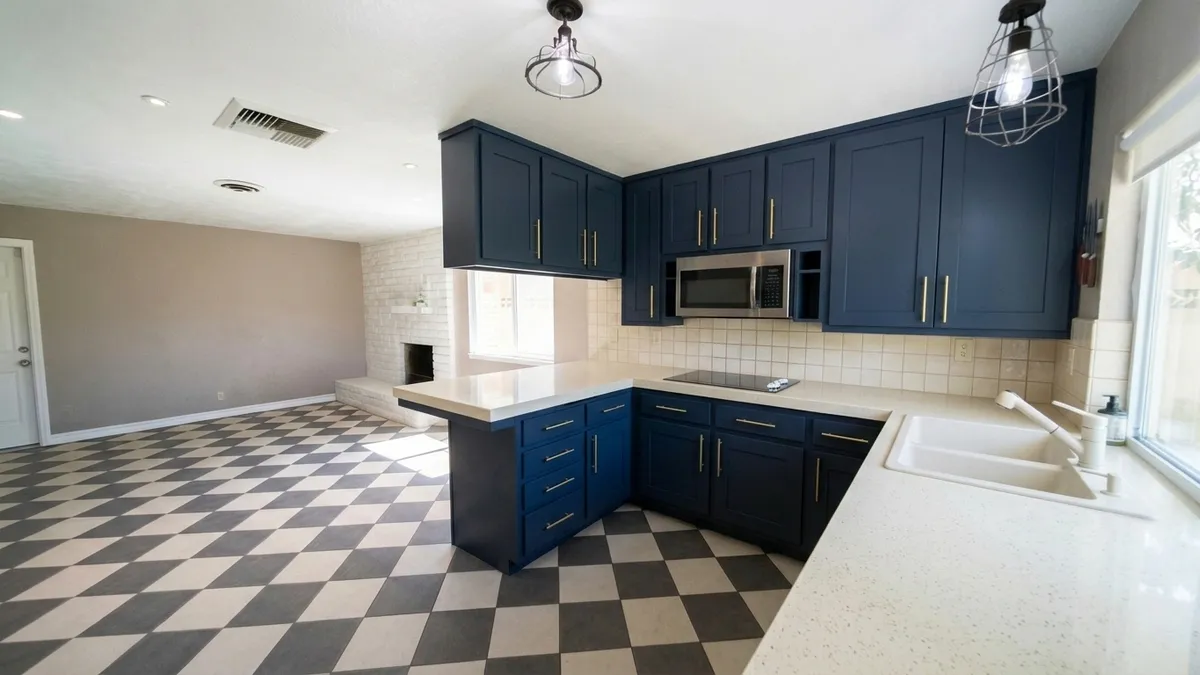
The first result: the same room and camera angle as the before photo, with the cabinets, countertop, backsplash and sink taken from the pin.
3 free designs. No account needed.
To make your kitchen look like a Pinterest kitchen you like, copy its materials, not the room: the cabinet color, door style, hardware, countertop and backsplash. And yes, there is an app for it. Kitchen AI on iPhone puts the look of a photo onto a photo of your own kitchen, so you can see the combination before you buy anything.
We tried it with one inspiration photo and one real kitchen, twice. The second time we copied two more things than the first. The two results disagree in ways that teach you more than the nicer-looking one does.
What do you actually copy from a Pinterest kitchen?
A pin is a whole room: the layout, the window, the light at that hour, whatever is styled on the counter. Only part of that can move to your kitchen. What travels is the surfaces: cabinet color and door style, hardware, countertop, backsplash, faucet, floor and wall color. What stays behind is the footprint, the window, the ceiling height and the daylight.
So before you save more pins, look for what repeats across the ones you already have. Usually it is one cabinet color, one door style, one hardware finish and one kind of countertop. Write those down as must-haves, and call everything else a nice-to-have.
It also helps to know which parts are cheap to change in real life. Paint and hardware sit at the cheap end. The layout and the windows do not. A pin that depends on moving the sink or adding a window is a different project from one that depends on a cabinet color. If you are still deciding on color, how to try cabinet colors before painting covers the options, and the kitchen styles page shows the looks that pins tend to fall into.
Which kitchen and which photo did we use?
The room is an L-shaped kitchen with a peninsula, open to a living area. Nothing in it matches. The upper cabinets are painted white and the lower ones are cream, so the two runs never agree. The countertop is white square tile with grout lines, the backsplash is smooth gray, and the floor is a black-and-white checkerboard. There is one window over a stainless steel sink, two black cage pendants, three upper cabinet doors hanging above the peninsula, and four drawers stacked at its end. Behind it all stands a white painted brick fireplace.
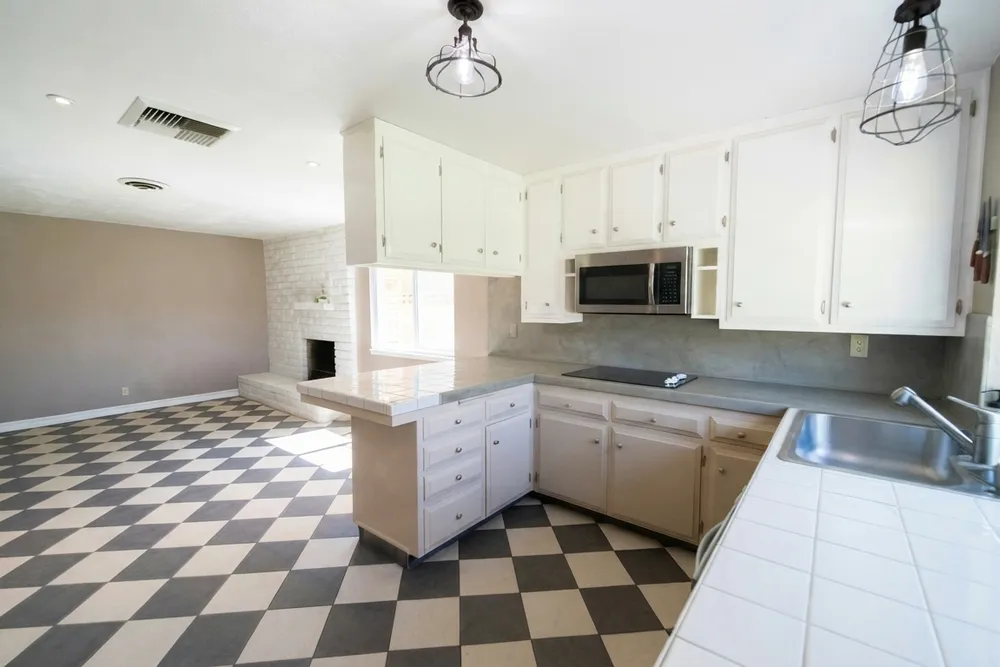
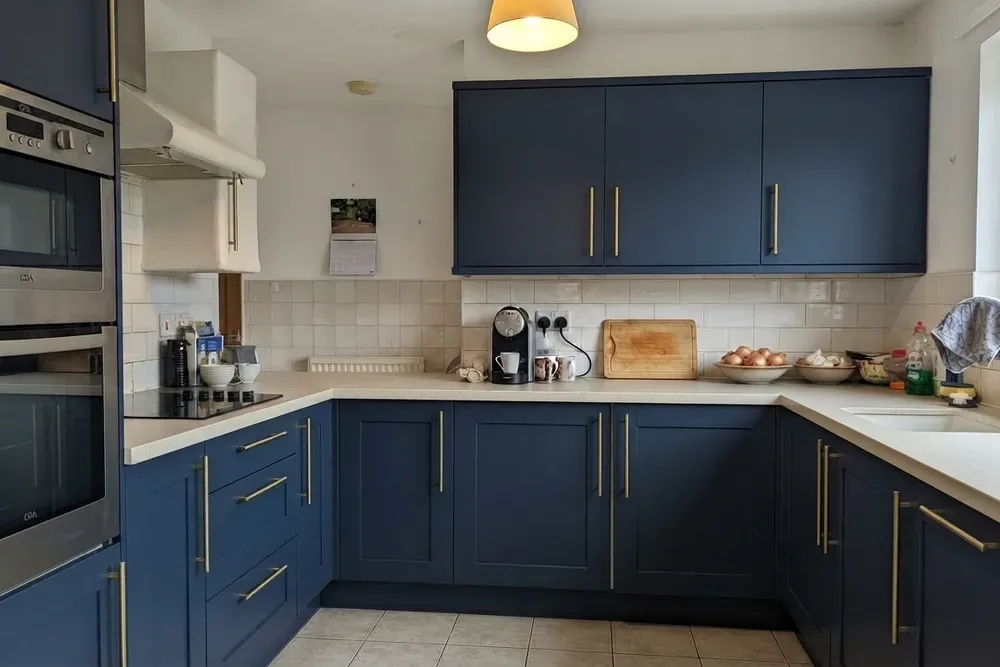
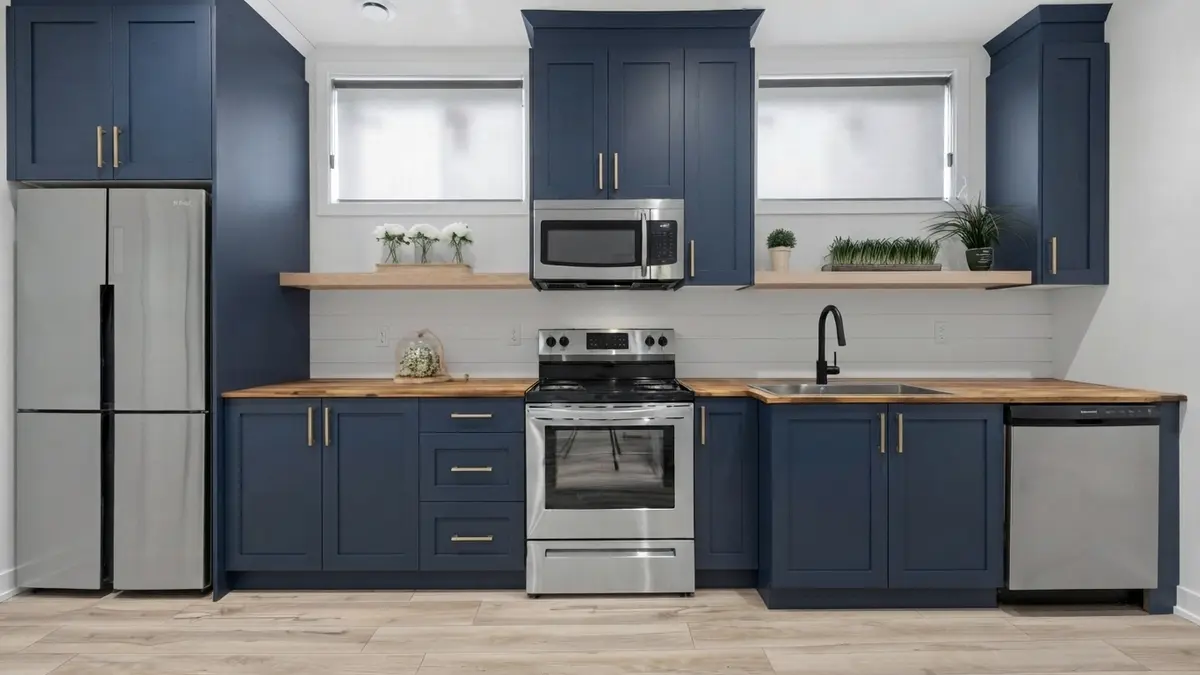
One honest note about the pin: it is not a real Pinterest pin, because we can't republish someone else's photo. It is an earlier Kitchen AI render of a British kitchen from our own archive, which we used as the stand-in.
What the stand-in shows is a U-shaped kitchen with navy shaker cabinets, long brass bar pulls, a light speckled countertop, cream square tiles on the wall, a white sink, beige square tiles on the floor, cream walls and a fabric pendant shade. It is a good test because very little in it matches our room. If the app can carry that look over, we can see how far. Navy on its own gets its own page: what goes with navy kitchen cabinets.
What happened when we copied the cabinets, countertop, backsplash and sink?
In the app this is the "Use a reference" flow. You pick "Your own photo" as the reference, and under "What do you copy?" you choose, item by item, whether it comes from the reference, stays your own, or becomes something else. Kitchen layout was set to "Keep as is", then "Combine". We chose "Cabinet fronts" (the handles come with them), "Countertop", "Backsplash", and the faucet and sink. Floor, wall color and lighting stayed ours.
The picture at the top of this page is that result. Every cabinet, upper and lower, became navy shaker with brass bar pulls, so the white and cream mismatch is gone. The tiled countertop turned into one smooth cream surface with no grout lines, on the main run and on the peninsula. The gray backsplash became cream square tiles, close to the pin's. The stainless sink became a white double-bowl sink.
Just as useful is what did not move. The checkerboard floor, the taupe walls, both cage pendants, the microwave, the cooktop, the small open shelf, the window and the fireplace are all exactly where they were. The layout and the camera angle match the before photo.
The faucet is a lesson in itself. The pin never shows its faucet clearly, so the app had to choose one, and it picked a chrome-looking pull-down. Whatever the pin doesn't show, the app guesses.
What changed when we also copied the floor and the wall color?
Same pin, same room, same "Keep as is". This time we also copied "Floor" and the wall color.
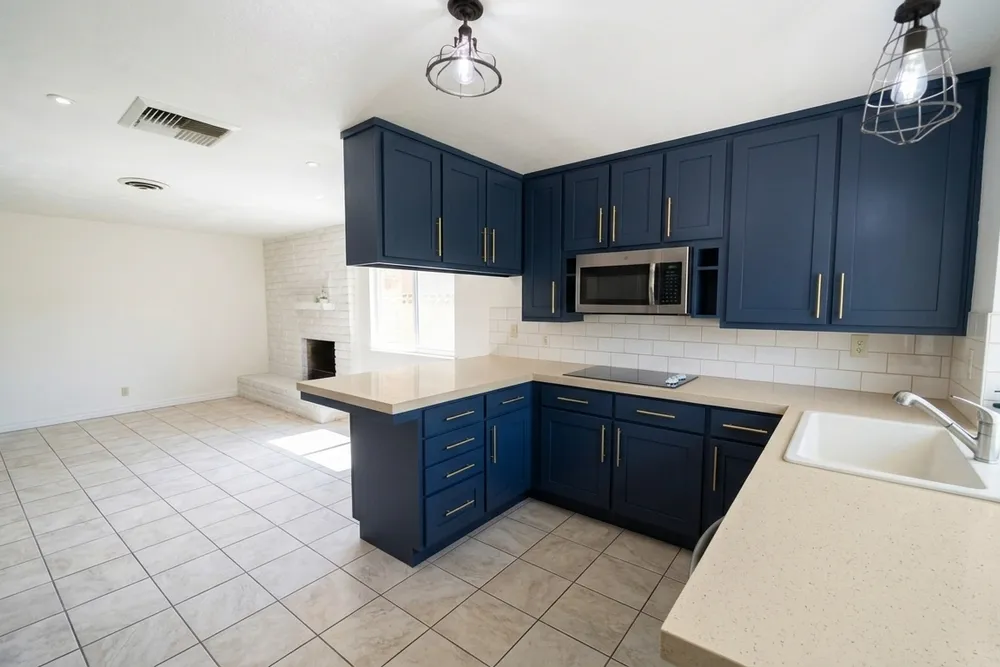
The checkerboard became beige square floor tiles like the pin's. The taupe walls turned white, including the living-area wall far from the kitchen. The cabinets came out navy shaker with brass pulls again. With white walls and a pale floor, the navy cabinets are now the only dark surface in the room. In the first result the checkerboard competed with them; that is a change the cabinets alone could not make.
The surprise is in the items we copied both times. The countertop came out beige with a speckle, closer to the pin's speckled top than the plain cream of the first run. The backsplash came out as white rectangular subway-style tiles, further from the pin's cream squares than the first run. The sink is now a single white bowl instead of a double.
So the same pin, with the same item selected, produced a different countertop, backsplash and sink on a second run. Neither is wrong. They are two readings of one photo, and you would choose between them the way you choose between two samples. The fabric pendant shade from the pin never showed up in either result.
How do you copy a kitchen design from a photo without regretting it?
Four habits came out of the two runs.
- Choose items one at a time. The floor and the wall color changed the mood as much as the cabinets did. If you copy everything at once, you can't tell which choice made the room feel right.
- Look at the details before you judge the whole. Check the tile shape, the sink and the grout lines. If one item came out off, make another design, or pick "something else" for just that item.
- Pick a pin that shows the item up close. A shot where you can see the door style and the tile shape transfers better than a wide, styled photo where the backsplash is a strip at the edge.
- Expect a guess where the pin is silent. If the faucet, the pulls or the floor are not visible, the app fills them in. Choose a different pin, or choose that item yourself.
If you want the longer answer on seeing cabinets on your own photo, our guide to apps that show new kitchen cabinets covers what the app gets right and where it slips. More rooms are on the before and after page.
What can't an app do with your pin?
It gives you an impression, not a measured design. It is not a quote or a materials list, and it does not draw a floor plan. It also doesn't move walls, windows or plumbing: in both results, the window, the sink position and the cooktop stayed put. And it never brings over a layout. The pin's U-shape, its size and its light stay in the pin.
The app is iPhone only, and there is no Android version. The first 3 designs are free, after that there is a weekly subscription.
What do you do with the pins you already saved?
Open your board and find the three that repeat the most. Write the shared color, door style, hardware and countertop on one line. Then pick the single photo that shows those clearly and try it on a photo of your own kitchen, one item at a time. When something looks right in the picture, you can take that to a showroom or a contractor and ask about the real thing. For more on choosing, the Kitchen AI blog has more kitchen guides.
Published October 26, 2026. The images in this article were made with Kitchen AI and are an AI impression, not a technical drawing. How we mark that.
I build Kitchen AI on my own: the app that shows your own kitchen in a different style. For these articles I test everything in real rooms, with real photos, and write down what happens. Something wrong, or missing? Let me know.