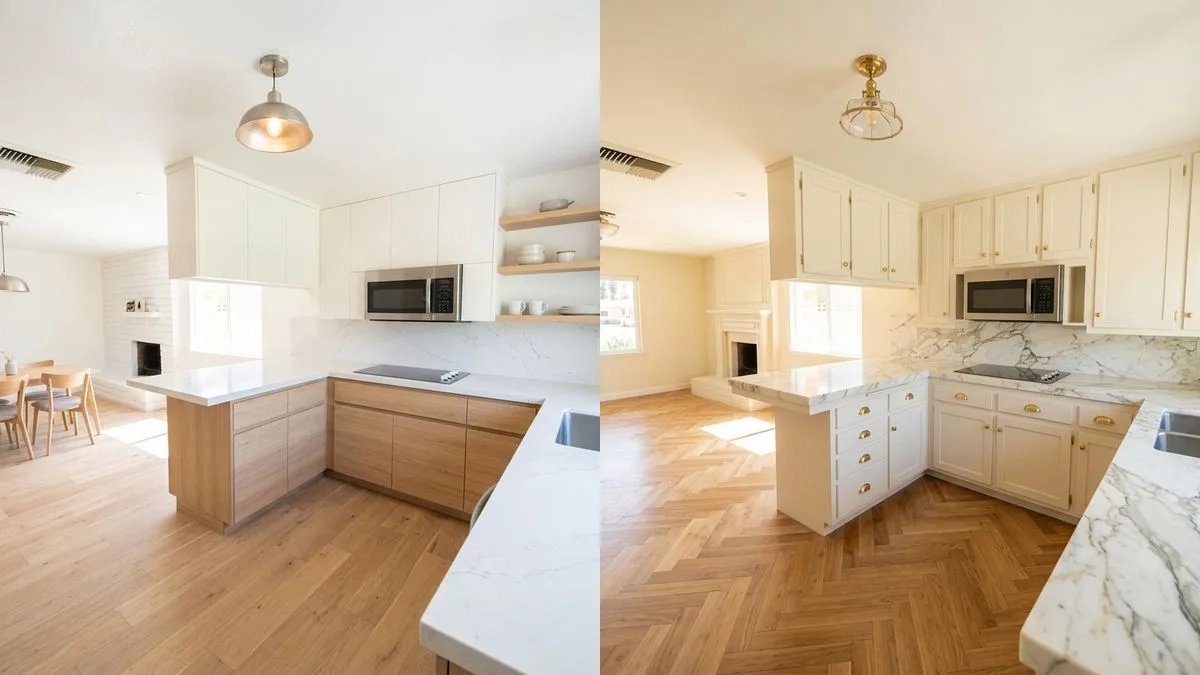
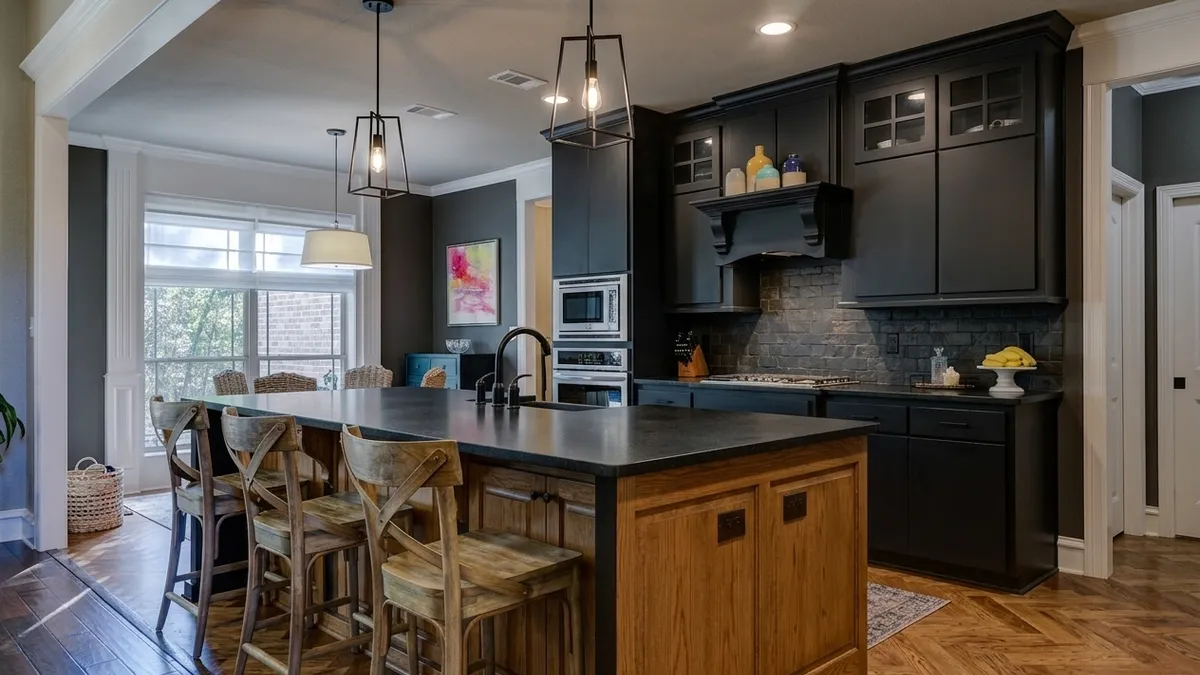
 Kitchen AI

 Modern
 Scandinavian
 Japandi
 Modern farmhouse
 Industrial
 Quiet luxury
- See it first
- Cabinets
- Before you buy
Is There an App to See What My Kitchen Would Look Like With New Cabinets?
Yes, and you do not need measurements, a floor plan, or a designer appointment. You photograph the kitchen you already have, pick a cabinet color and finish, and get the same room back with different cabinets in it. Below is what that actually looks like on a real, dated oak kitchen, and the three places it still gets things wrong.

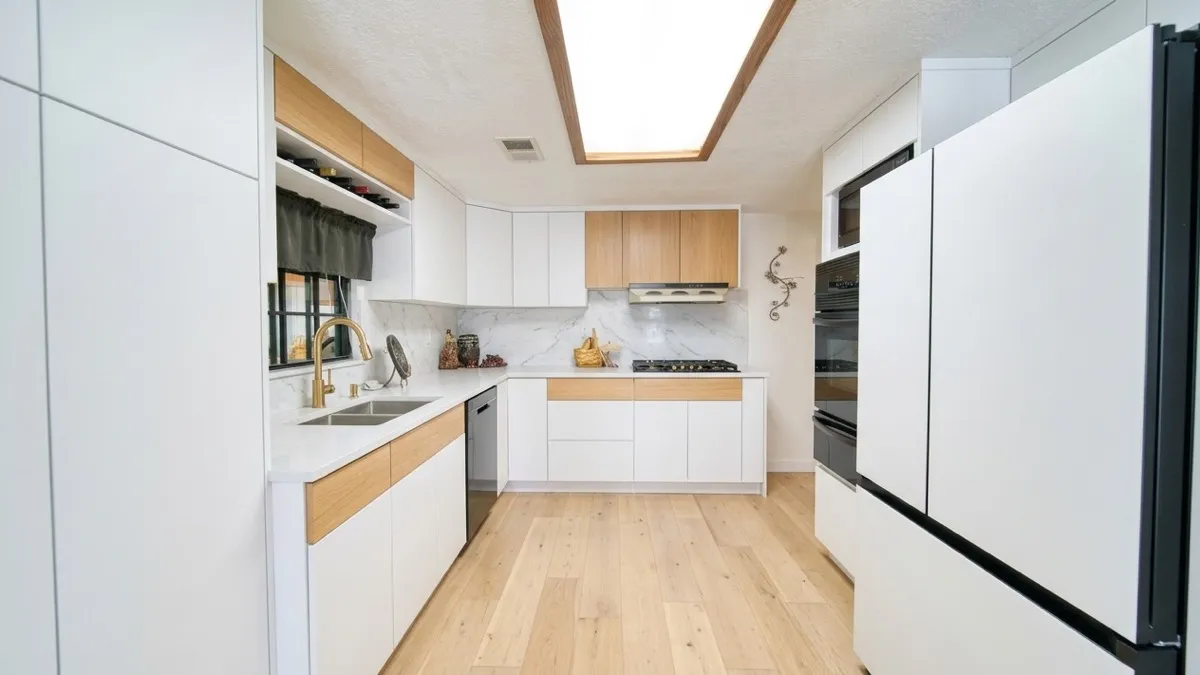
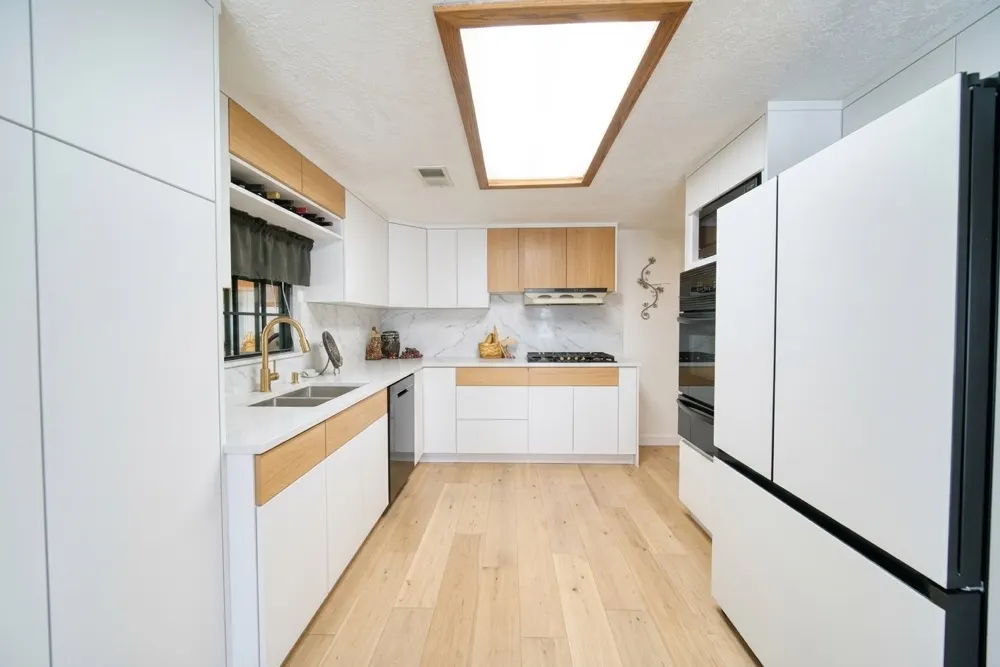
The same galley kitchen you will see in its original state a few paragraphs down. The window, the wall oven and the refrigerator stayed exactly where they were. The wine rack over the sink did not survive, which is the kind of thing worth checking in your own result.
3 free designs. No account needed.
Yes. Apps like Kitchen AI, Remodel AI and Block Renovation's cabinet visualizer take a photo of your kitchen and render the same room with different cabinets, counters and flooring, usually in under a minute. They are accurate enough to settle a color or finish decision and to rule options out. They are not accurate enough to plan a layout, price a job, or show a specific manufacturer's door.
The question people actually ask is narrower than it looks. Almost nobody wants a floor plan. They are standing in a kitchen they have looked at for fifteen years, they have a paint chip or a showroom photo in hand, and they cannot picture it on their own walls. A cabinet quote runs into five figures, and the one thing that would make the decision easy is the one thing nobody can give you: a picture of your kitchen with the new cabinets already in it.
That is now a solved problem, with limits worth knowing before you rely on it.
How these apps actually work
You give the app a photo. It reads the room from that photo: where the cabinet runs are, where the window and appliances sit, which direction the light comes from. Then it regenerates the whole image with the materials you picked. You are not getting a sticker pasted over your cabinet doors; you are getting a new photograph of the same room.
That distinction explains both the strength and the weakness. The strength is that shadows, reflections and the way daylight falls across a counter all update together, which is why the result reads as a photo rather than a mockup. The weakness is that everything in the frame is up for regeneration, including things you did not ask to change. More on that below.
Two things matter more than which app you choose. Shoot from a corner so two cabinet runs are visible, and shoot in daylight with the overhead lights off. A photo taken at night under a single ceiling fixture gives the model almost nothing to work with, and the result looks flat no matter what you pick.
Which apps show new cabinets on a photo of your own kitchen?
Several do, and they fall into two kinds. AI photo redesigners, such as Kitchen AI, Remodel AI and Block Renovation's cabinet visualizer, take one photo of your kitchen and return the same room with new materials. Planners, such as IKEA's kitchen planner and the planner side of Planner 5D and Homestyler, have you build the room in 3D first. Only the first kind answers "what would my kitchen look like with new cabinets" from a single photo.
| Tool | Your photo? | What you change | Platform and cost |
|---|---|---|---|
| Kitchen AI | Yes | Cabinets, door style, counter, backsplash, faucet, floor, wall, handles, each separately | iPhone only. 3 free designs, then weekly |
| Remodel AI | Yes | The whole room, in one of 30+ styles | iPhone, Android. 3 free designs, then paid |
| Block Renovation | Yes | Cabinets, door style, hardware, counter, backsplash, paint, floor | Web, sign-in. Free |
| Planner 5D | Yes, or a 3D plan | Style, furniture, colors, materials | Web, desktop, phone. Free with limits |
| Homestyler | Partly | Style, furniture, materials | Web, phone. Free to start |
| IKEA Kitchen Planner | No, you draw the room | Layout and cabinets from IKEA's range | Web. Free |
Pick by what you are stuck on. If the question is color or door style on the kitchen you already have, use a photo redesigner. If you are moving walls or planning a new layout, use a planner; a photo app will only frustrate you there, because it cannot measure anything.
Between the photo tools, the difference is how much you steer. A whole-room restyler like Remodel AI pushes everything toward one style at once. Kitchen AI and Block Renovation let you pick the cabinets, counter and floor separately, though the model can still change things you did not pick, as the test below shows. Block Renovation's tool is free and runs in a browser; it is made by a renovation company that also offers to do the work. Kitchen AI runs on iPhone only. There is no Android version.
One kitchen, three sets of cabinets
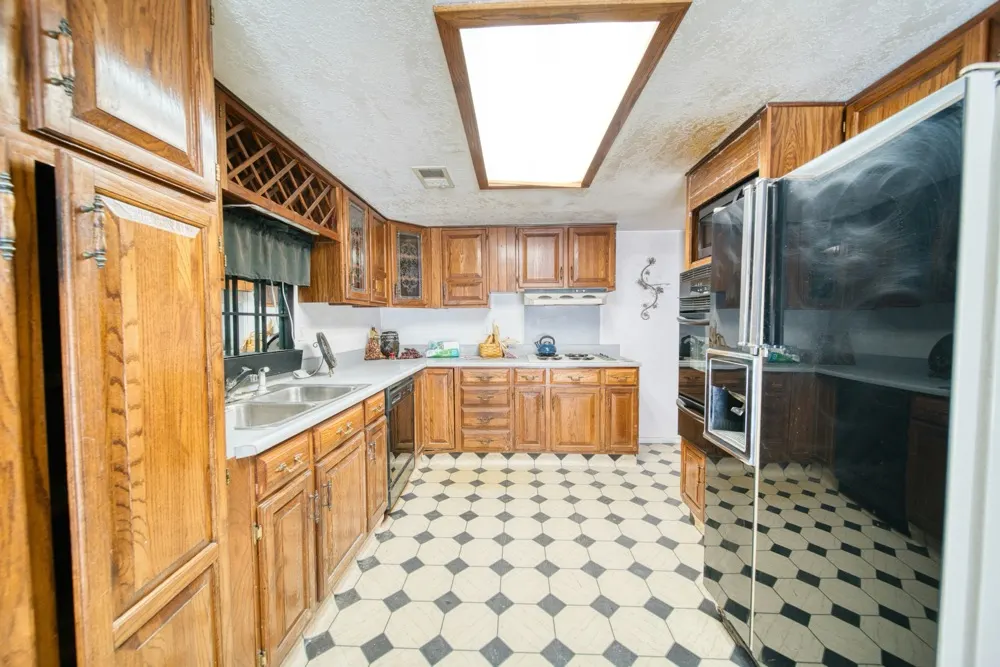
We ran one kitchen through six different looks in the app and kept three for this article. It is a galley with a peninsula, raised-panel oak doors with antique brass pulls, a wine rack over the sink run, two upper cabinets with leaded glass, laminate counters, a black-and-white checkered vinyl floor, and a fluorescent light box set into the soffit. If you grew up in a house built between 1978 and 1992 in the United States, you have stood in this kitchen.
The first version replaces the doors outright: flat slab fronts in white with light oak accents, a marble backsplash and a pale plank floor. This is the one that reads as a full remodel, and it is also the one where the app took the most liberty. The wine rack is gone, the leaded glass is gone, and the run that held them became plain cabinetry.
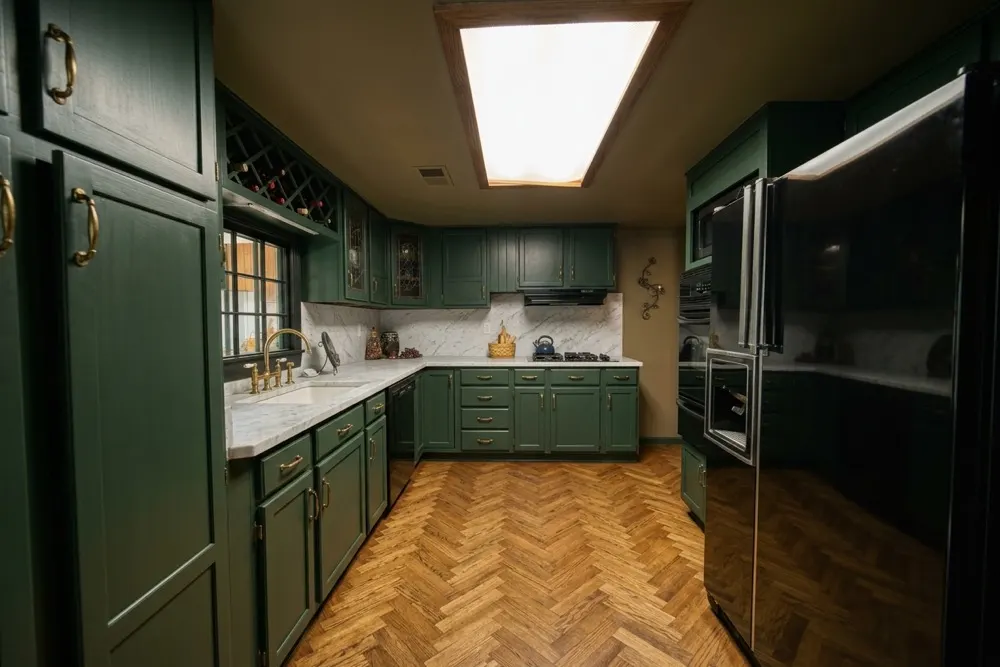
The second version is the more useful one if you are considering paint rather than replacement, and it is also the one that shows how precise you have to be when reading these results. The layout and the fittings survive: the wine rack is still there, so are the two upper cabinets with leaded glass, and every run sits where it did. The door profile does not survive. The ornate arched raised panel of the original became a plain recessed panel. So this image answers the color question well and the door question badly, and those are easy to confuse when the overall impression is convincing.
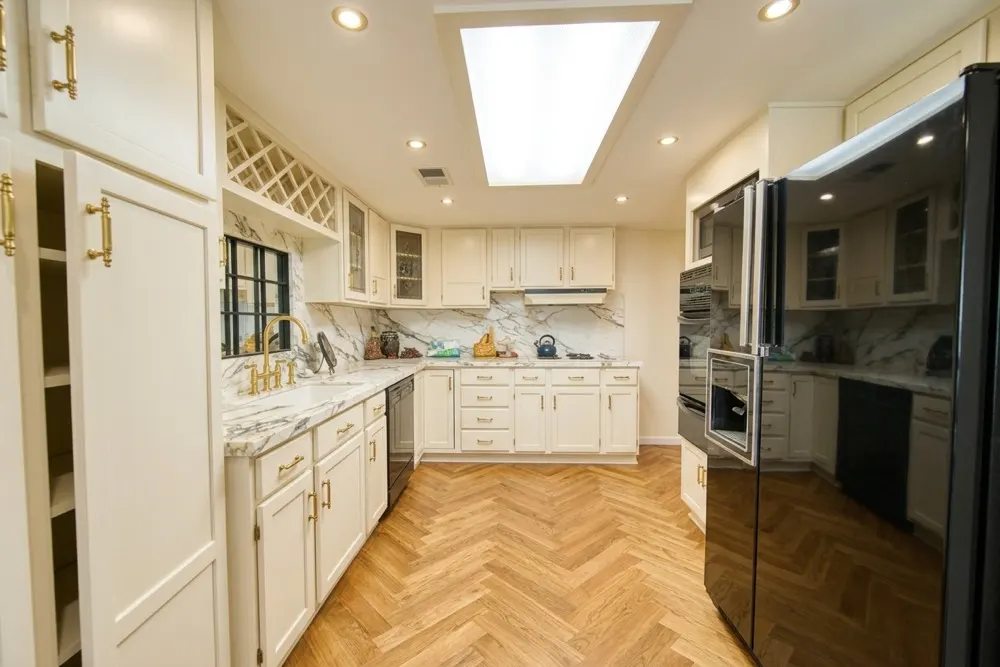
The third version is the one that shows the trap. Cream cabinets, marble counters, a full-height marble backsplash, brass pulls, herringbone floor. It is the most appealing of the three, and it quietly added recessed can lights to the ceiling that do not exist in the real kitchen.
| Version | What you asked for | What it also changed |
|---|---|---|
| White and oak | New slab fronts, marble backsplash | Removed the wine rack and the leaded glass; new plank floor |
| Dark green | Color on the existing doors | Simplified the arched door panels to flat ones; warmed the wall color; herringbone floor |
| Cream and marble | New fronts, marble counters | Added recessed ceiling lights; herringbone floor |
What to look at in the result
Judge the things that carry over into the real world, and ignore the rest.
Look at the color against your own light. This is the thing the app is genuinely good at and the reason to use it at all. A white that looks clean in a showroom can go gray in a north-facing kitchen, and the render will show you that because it is using your window, your time of day and your wall color. If you are stuck between two near-identical whites, this is the fastest way to break the tie. We went into that specific comparison in white versus off-white cabinets.
Look at the door profile if you are painting. Ask for a color change, not a new kitchen, then compare the doors in the result against your own, panel by panel. In our green version the app kept the wine rack and the glass uppers but flattened the raised panels, which is a realistic preview of the color and an optimistic preview of the doors. If it replaced them with slabs altogether, you are looking at a replacement quote, which is a different budget entirely.
Ignore the floor unless you asked about the floor. In all three versions above the floor changed without being asked. That is not a defect so much as the model completing a look, but it does mean you are judging two decisions at once when you meant to judge one. If you want an honest read on the cabinets alone, run it twice with different floors and see whether you still like the cabinets. Whether they should match at all is its own question, and the short answer is no: we covered it in should cabinets match the floor.
Ignore the hardware. Pulls and knobs render at a size and spacing the model invents. Treat them as a suggestion of finish, brass versus black versus nickel, and nothing more.
What the app can't do
Three real limits, in the order you are likely to hit them.
It will not hold your layout sacred. The app regenerates the whole photo, so a soffit can lose its trim, a wine rack can vanish and ceiling lights can appear. Everything structural in your kitchen is a suggestion to the model, not a constraint. If a specific feature matters to you, check it in the result rather than assuming it carried over.
It cannot show you a specific product. There is no way to say "Shaker in Benjamin Moore Simply White from this manufacturer" and get that exact door back. You get a convincing interpretation of a flat front or a raised panel in roughly that color. For a purchase decision on a specific line, you still need a door sample in your own kitchen, held up next to the render. That is not a workaround, it is the correct order: the app narrows six options to one, the sample confirms it.
It has no idea what anything costs. The cream-and-marble version and the dark green version are an order of magnitude apart in price, and they look equally achievable on screen. Painting existing doors and replacing every cabinet in the room are different projects, and the render flattens that difference completely. If you are weighing keeping your boxes against tearing them out, our piece on custom doors on existing cabinet boxes covers what actually stays and what goes.
Frequently asked questions
Do I need to measure my kitchen first?
No. These apps work from a photo, not from dimensions. That is also why they cannot help you plan a layout or check whether a new island fits. Measuring matters for the build, not for the picture.
Is there a free app to see new cabinets on my kitchen?
Kitchen AI gives you 3 free designs without an account, which is enough to run your own kitchen and see whether the result is useful to you. More designs need a subscription. Block Renovation's cabinet visualizer is free in the browser after a sign-in. Retailer planners like IKEA's are free too, but they show their own product lines and start from a room you draw rather than your photo.
How accurate is the result?
Accurate enough to judge color, finish and overall tone in your own light, which is what most people are stuck on. Not accurate enough to judge a specific product, a price, or anything structural. Treat it as a way to eliminate options quickly, then confirm the survivor with a physical sample.
Does it work on an old kitchen, or only on new ones?
Old kitchens are the easier case. A dated kitchen with a strong existing character, like the oak one above, gives the model clear edges and depth to work from. Kitchens that photograph badly are the ones with no daylight or a single wall visible in the frame.
What to do with the pictures
Run three or four versions in one sitting, not twenty. The useful output is not one perfect image, it is the moment you notice you keep discarding every dark option, or that the warm white beats the cool white in your kitchen every time. That is a decision you can take to a showroom.
Then take the two you kept and put a real sample next to them. If you want ideas on where to start, the kitchen styles guide has the six directions most of these decisions fall into, and the modern kitchen page is the closest match to the white and oak version above. If you start from a photo of someone else's kitchen instead, recreating a Pinterest kitchen shows which parts of a pin carry over to your own room and which the app has to guess.
Published September 17, 2026. Updated October 9, 2026 with a comparison of other apps. The images in this article were made with Kitchen AI and are an AI impression, not a technical drawing. How we mark that.
I build Kitchen AI on my own: the app that shows your own kitchen in a different style. For these articles I test everything in real rooms, with real photos, and write down what happens. Something wrong, or missing? Let me know.