 Kitchen AI

 Modern
 Scandinavian
 Japandi
 Modern farmhouse
 Industrial
 Quiet luxury
- Backsplash
- Granite
- See it first
What Backsplash Goes With Granite Countertops?
One real kitchen with busy granite, and only the backsplash changed: continuous granite, marble and cream glass, with what each did to the room.

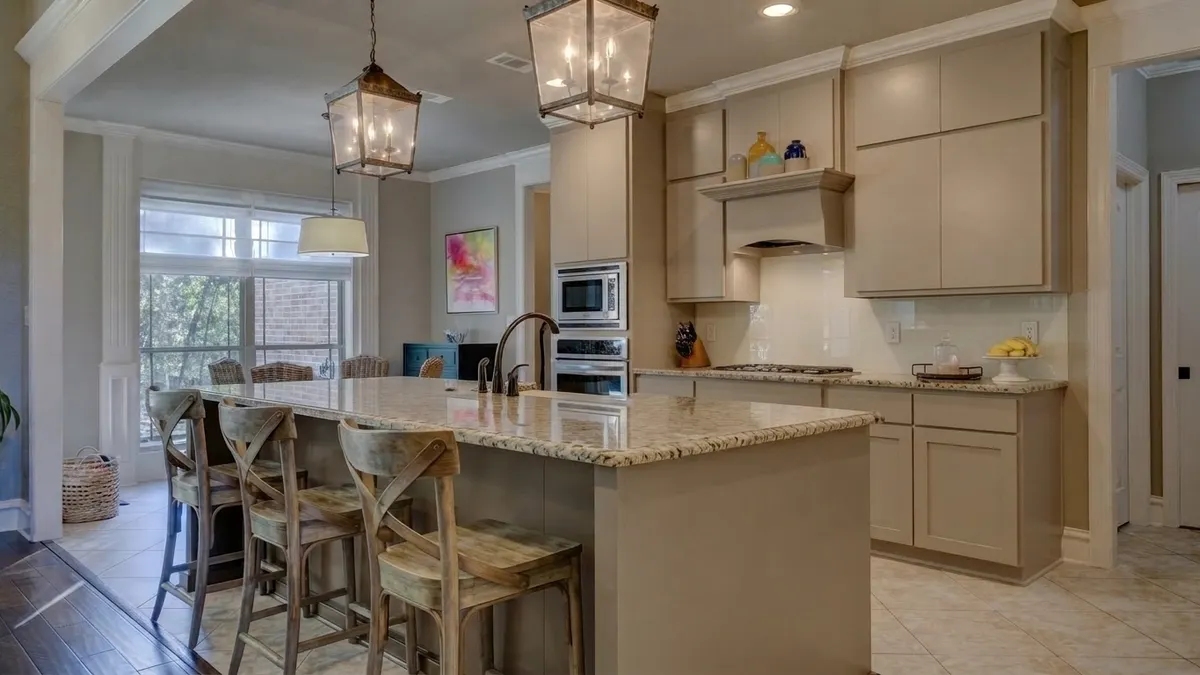
The same kitchen with a cream back-painted glass backsplash. Only the backsplash changed; cabinets, granite, floor, stools and pendants are as in the photo.
3 free designs. No account needed.
Usually a quiet one. Busy granite is already the pattern in the room, so the backsplash does best when it stays plain and takes its color from the granite's background, not its darkest flecks. A second patterned stone next to it competes.
One kitchen, three backsplash options, one render each
The room is an open kitchen with greige flat-front cabinets and a shaker-panel lower run. Speckled light granite, a cream and beige background with gold, gray and dark brown flecks, covers both the perimeter counter and a large island with three wooden bar stools. A gas cooktop sits under a wood range hood that interrupts the run of upper cabinets. The wall also has two outlets and runs from a tall oven cabinet to a doorway.
We used one photo of it and ran it through Kitchen AI three times, using three of the app's own backsplash options: Continuous slab, Marble slab and Solid glass. Only the backsplash changed each time. Cabinets, granite, floor, stools and pendants stayed. One render per option, no retries, so this is what happened in this room, not a rule.
The white subway tile is the baseline
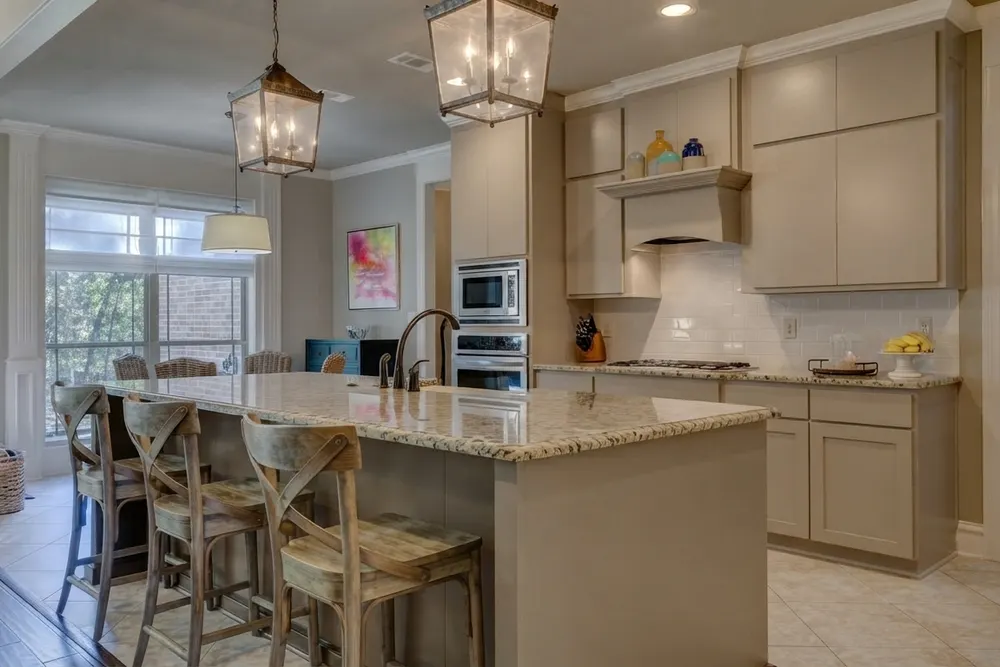
The tile is brighter and cooler than the greige cabinets, and it is the one cool, glossy white in a warm room. That jump is easy to miss until something else replaces it. The tile itself is not busy, which is why the granite stays the only pattern on the wall. Every render below gets compared with this one.
Carrying the granite up the wall makes the wall the busiest thing in the room
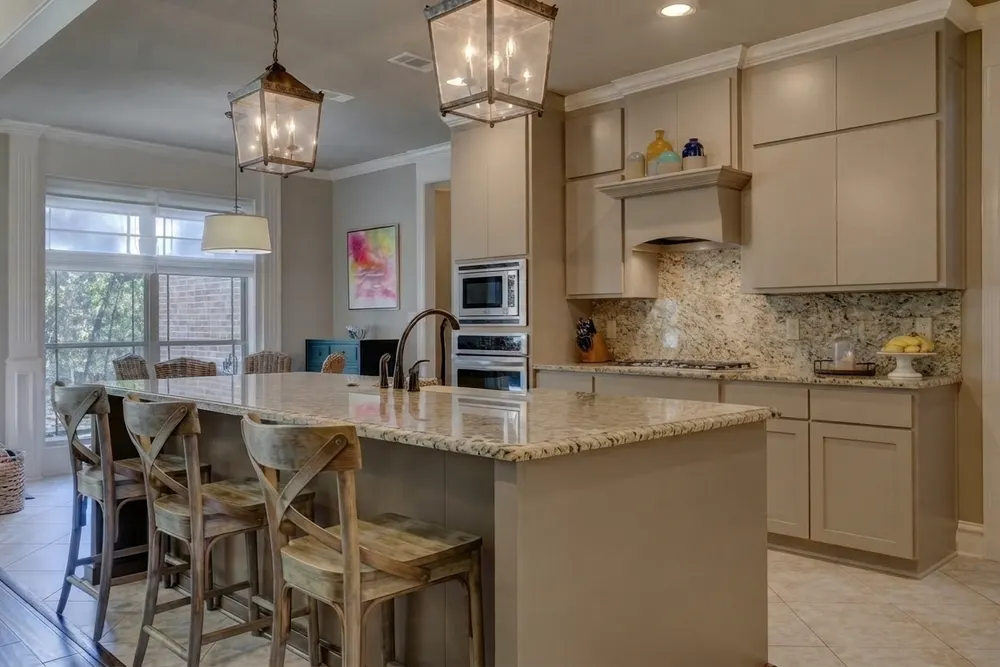
The full height granite backsplash did one thing well: the line where the counter meets the wall disappeared. Counter and wall read as one speckled surface. But the knife block and the fruit bowl got lost against it, and the wall became the busiest thing in the room.
With a calm granite, that could look deliberate. With a busy one like this, it is a lot of speckle in one place, and the eye has nowhere to rest. If you like the continuous look, it asks for the quietest granite you can find, or a slab with little movement.
Marble next to granite: two patterns competing
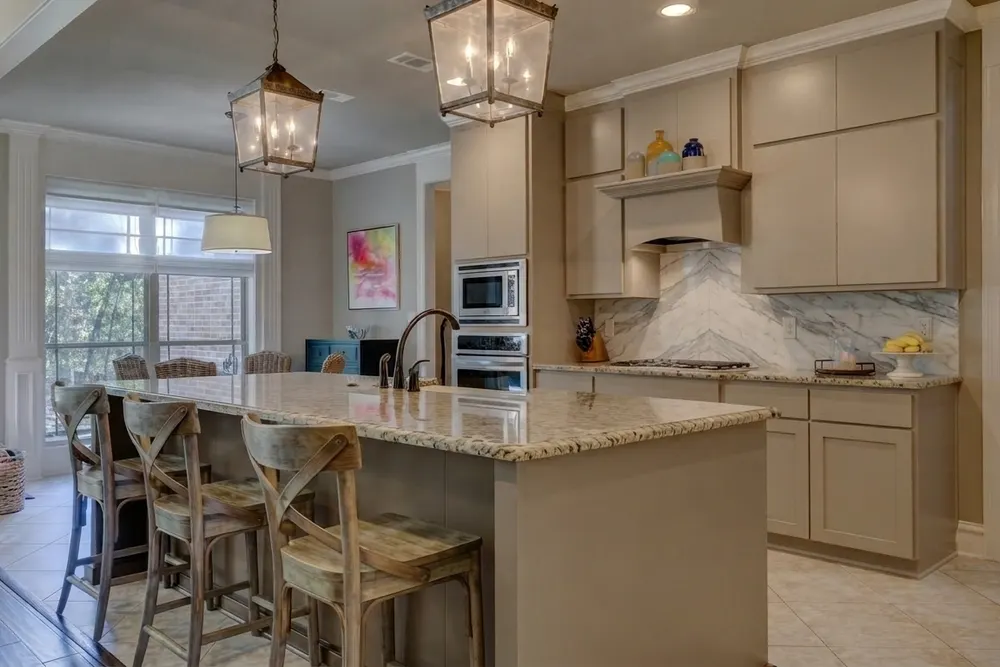
A marble backsplash with granite countertops put two patterned stones side by side, and neither won. The marble's cool gray veins sat next to the warm gold and beige granite, and the granite looked yellower beside it. The chevron also pulled the eye straight to the cooktop.
It is a handsome backsplash on its own. Here it argued with the counter. If you love marble, a granite with a quieter background and fewer flecks gives it more room. And if the countertop itself is still open, start with our test of countertop colors for white cabinets.
Cream glass left the granite as the only pattern
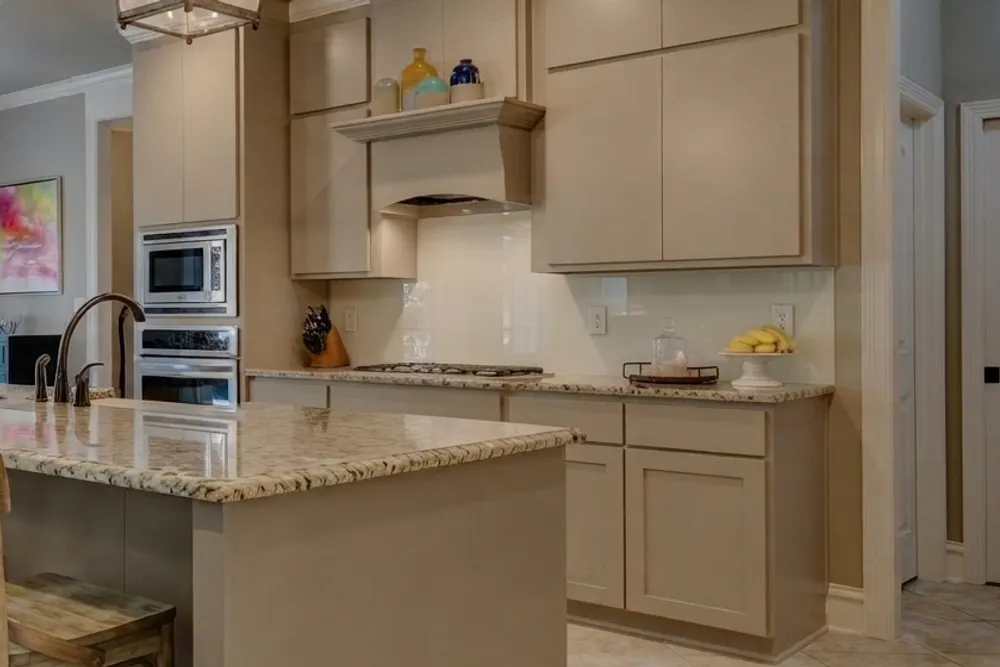
This is the one in the hero photo, and it worked best here. The glass is close to the cabinet color, so the granite edge became the only pattern on that wall. The bright, cool jump of the white subway tile was gone, because the cream sits much nearer the greige cabinets.
Two details to read honestly. The render shows one vertical seam, which is believable: a long glass backsplash usually goes up in more than one panel, cut around the outlets, and this wall has two. And the glass reflects the light under the cabinets. Whether you like that is a taste call.
Read your granite before you pick tile
Three checks you can do at your own counter, before you look at a single tile.
- Background versus flecks. Find the color that fills most of the stone, then the colors of the flecks. Pick the backsplash from the background. Matching the darkest fleck makes the wall look heavy and muddy.
- Fleck size and movement. Large flecks, swirls or bands mean a busy granite: keep the wall above it plain. A quiet granite with fine, even flecks can take more pattern above it.
- Undertone. Is the stone warm (gold, beige, brown) or cool (gray, black)? Hold a white tile sample against it in daylight. A white that looks clean beside the stone is the one to keep looking at, and one that makes the granite look yellow is the one to drop.
Those three answers also tell you whether a backsplash that matches the granite is a good idea. Most of the time you want to match the background and stay plainer than the stone, not copy it.
Can you see a new backsplash on a photo of your own kitchen?
Yes. With a photo-based app such as Kitchen AI, you take a photo of your kitchen, pick one of the 12 backsplash options, and see it on your own photo while the countertop stays as it is. It starts with 3 free designs and needs no account.
You can also do it without an app. Tape a real tile sample or a sample board to the wall above the counter and look at it in the morning, at midday and with the lights on in the evening. Granite and glass both look different as the light changes, and a sample shows you that. The app gives you an impression of the idea, not exact tile size, grout color or measurements, so the two work well together. For a wider look at apps that work on your own photo, there is a comparison of apps that show new cabinets in your own kitchen.
What these renders can't tell you
- No control over tile size or grout. You pick an option, not a tile format or a grout color.
- No price and no measurements. The app gives no quote and no materials list. A slab, glass panels and tile cost and install very differently, and the render does not show that.
- It is an AI impression. The images are not a drawing or a photo of a product, and the single seam in the glass render is an impression of where panels might meet, not a layout.
- Screen color is not real light. Granite and glass both shift in your own light. Check a physical sample before you order anything.
If you are still choosing the cabinets as well, small kitchen cabinet colors tested in one room shows the same one-photo method on the cabinets. The kitchen styles page has full looks to start from.
Take one photo of your kitchen, try the glass, the slab and the plain tile, and keep the one that leaves your granite as the only pattern you notice. Then tape up a real sample and look at it for a day.
Published October 22, 2026. The images in this article were made with Kitchen AI and are an AI impression, not a technical drawing. How we mark that.
I build Kitchen AI on my own: the app that shows your own kitchen in a different style. For these articles I test everything in real rooms, with real photos, and write down what happens. Something wrong, or missing? Let me know.